
Auto-broadcast to Kaspi chat: buyer messages without manual work
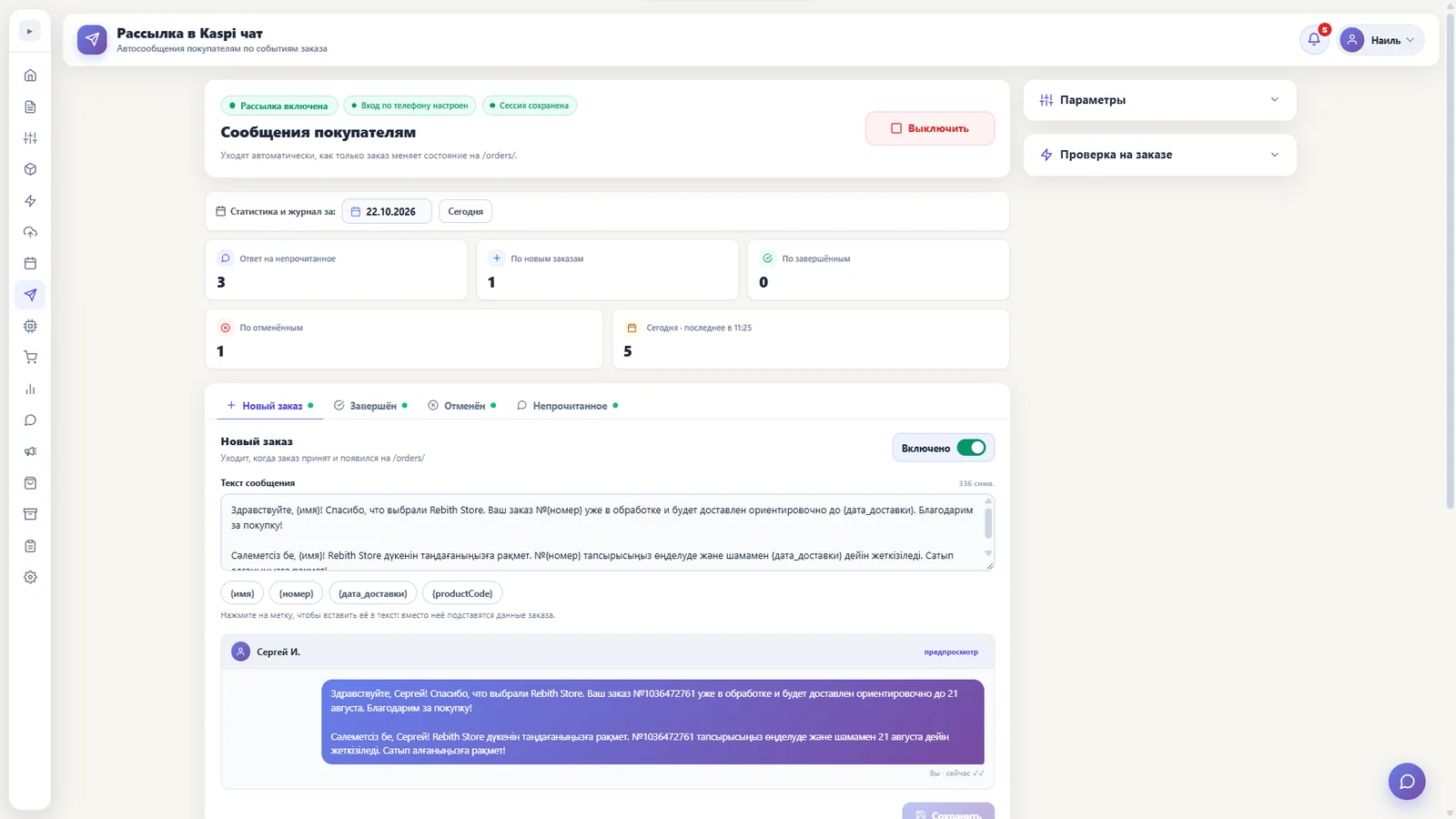
The “Broadcast” section of the RebithReprice panel sends messages to buyers in Kaspi chat and replies to unread chats itself. The buyer gets an answer on time, and you don’t spend hours on messaging.
Why automate messaging
Buyers in Kaspi chat expect a quick reply. While the seller is busy packing and shipping, unread messages pile up — and so does the risk of losing an order or getting a bad rating.
Auto-broadcast takes over the routine: standard messages go out by themselves and unread chats get a reply even when you are away from the computer. You return to conversations only where a live person is needed.
What the “Broadcast” section can do
Broadcast to chats
A message to buyers in Kaspi chat — for example, a note about timing or order information.
Auto-replies
A reply to unread chats so the buyer isn’t left without a response while you’re busy.
One-button switch
You can start and stop broadcasting in the panel — no server or script setup.
Background operation
The bot runs on a separate server around the clock; no need to keep a computer or browser on.
How to use broadcasting well
- Keep it relevant. A short message about an order or timing works better than long advertising and doesn’t annoy the buyer.
- Follow Kaspi rules. Broadcasts must fit the marketplace’s seller rules — this protects your store.
- Keep real conversations for yourself. The auto-reply covers typical questions while you handle complex cases personally.
- Switch it on at peak times. On hot days — promotions, sales — auto-replies help most when there are too many messages for manual work.
Who benefits most from broadcasting
Sellers with a large order flow whose chats aren’t read in time, and stores where one person handles messaging alongside packing. Even a small store benefits: an auto-reply keeps you from missing messages at night and on weekends.
How to get started with it
- Open the “Broadcast” section in the panel — the store is already connected, no separate server setup is needed.
- Prepare the text. A short, clear message that suits most buyers.
- Switch on broadcast or auto-reply with one button and stop it the same way when needed.
Broadcast alongside orders and warehouse
Broadcast is part of one panel with orders, prices and warehouse. Stock and product records are handled by the “Warehouse” section — more on the page warehouse for a Kaspi seller.
| Without auto-broadcast | With RebithReprice | |
|---|---|---|
| Replying to a chat | When you get around to it | Automatic |
| At night and on weekends | Messages pile up | The bot replies |
| A computer is needed | Yes | No |
| Time spent messaging | Hours | Minimal |
How to connect
Sign up and connect your Kaspi.kz store in the panel with your seller ID and API token. The “Broadcast and chat” module is not in every plan: what your plan includes is shown in your cabinet and on the page pricingpage. If you need help connecting — message us, the WhatsApp link is on the contacts page.
Frequently asked questions
What can the “Broadcast” section do?
It sends messages to buyers in Kaspi chat and automatically replies to unread chats. It is switched on and off in the panel with one button.
Do I need to keep the panel open?
No. The bot runs on a separate server set up for your store and sends in the background — no computer or browser needed.
Are there restrictions under Kaspi rules?
Broadcasts must follow Kaspi.kz seller rules: relevant messages, no pushy advertising. The seller remains responsible for message content.
Is broadcast in every plan?
It is a separate module — “Broadcast and chat”, and the feature set depends on the plan. What yours includes is shown in your cabinet and on the pricing page; the module can be added separately.
Can I try it for free?
Yes, there's a free trial period: pay only after you're sure the bot works on your products.
Try it for free
Registration takes a minute. Pay only after you're sure the bot works on your products.
Sign up →