
Telegram notifications about new Kaspi orders
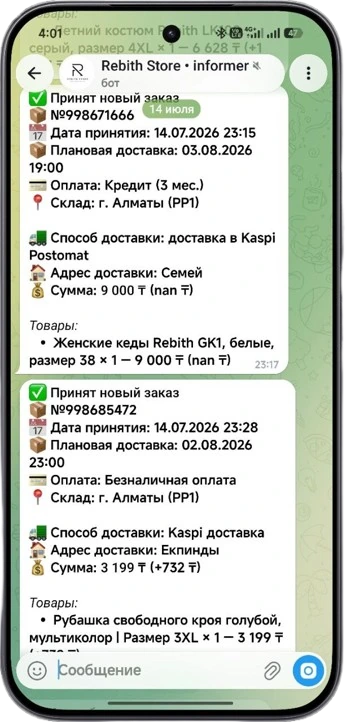
As soon as a new order arrives on Kaspi.kz, the RebithReprice bot sends it to Telegram: product, amount, warehouse, delivery method and address, payment. No need to keep the seller account open and refresh the orders page.
Why get Kaspi orders in Telegram
To avoid missing an order, a seller has to log in to the Kaspi account from time to time and check the list, and on a busy day — keep the tab open and refresh it. An order noticed an hour later is packed and shipped an hour later.
For most sellers Telegram is open all day on the phone anyway. The bot writes there itself — you see the order the very minute it appears, wherever you are: at the warehouse, on the road or in a meeting.
What comes in the notification
Product and amount
Exactly what was ordered and for what amount — without going to the account.
Delivery date
It's immediately clear how urgent the order is and when it needs to be handed over.
Warehouse
Which warehouse to collect the order from, if you have several.
Delivery and payment
Delivery method and address, payment method — all visible in a single message.
How to use notifications in your work
- Pack orders right away. The message arrived — you can head to the warehouse without waiting for someone to check the account. The earlier an order is packed, the smoother the handover to delivery goes.
- Keep an eye on urgent ones. The delivery date is visible in the notification, so orders with the nearest date are easy to spot and take on first.
- Distribute by warehouse. If there are several warehouses, the notification makes it immediately clear where to pack the order.
- Assess your day on the go. The stream of messages shows how sales are going — even when you're not at the computer.
Works in the background, no need to open the panel
The RebithReprice bot runs on a separate server deployed for your store and checks for new orders itself. Notifications arrive even if the control panel and Kaspi account are closed and the computer is off. All you need is Telegram on your phone.
What other notifications the bot sends
- Price changes — when the bot recalculated and updated a product's price.
- Appearance of a competitor — when a price lower than yours appeared in the card.
- Other important events in the store's operation.
This way you're aware of what the bot is doing without opening the panel. For more on how the bot tracks prices — see the competitor price monitoring page.
Orders, warehouse and pre-orders — in one panel
Telegram notifications are part of working with orders in RebithReprice. The panel itself stores a list of all Kaspi orders with history, the warehouse tracks stock and withdraws sold-out products from sale, and scheduled pre-order auto-update refreshes the status of products sold to order.
| Without notifications | With RebithReprice | |
|---|---|---|
| How to find out about an order | Log in to the account and check | A message in Telegram |
| When you find out | At the next check | Immediately on arrival |
| Order details | Open the order in the account | Already in the message |
| A computer is needed | Yes, or the account on your phone | Only Telegram |
How to connect
Register and connect your Kaspi.kz store in the panel — by the seller ID and API token. The set of features depends on the plan: which sections are included in yours is shown in your personal account and on the pricingpage. If you need help connecting — message us, the WhatsApp link is on the contacts page.
Frequently asked questions
What comes in an order notification?
Product, amount, delivery date, warehouse, delivery method and address, payment method — everything needed to start packing the order right away.
Do I need to keep the panel or Kaspi account open?
No. The bot runs in the background on the server and sends notifications even when the control panel and seller account are closed.
What other notifications does the bot send?
Besides orders — alerts about price changes, the appearance of a competitor with a lower price and other important events in the store.
Are notifications included in all plans?
The set of features depends on the plan — the current list is on the pricing page. If in doubt, message us on WhatsApp.
Try it for free
Registration takes a minute. Pay only after you're sure the bot works on your products.
Sign up →