
Warehouse for a Kaspi seller: stock tracking and delisting sold-out items
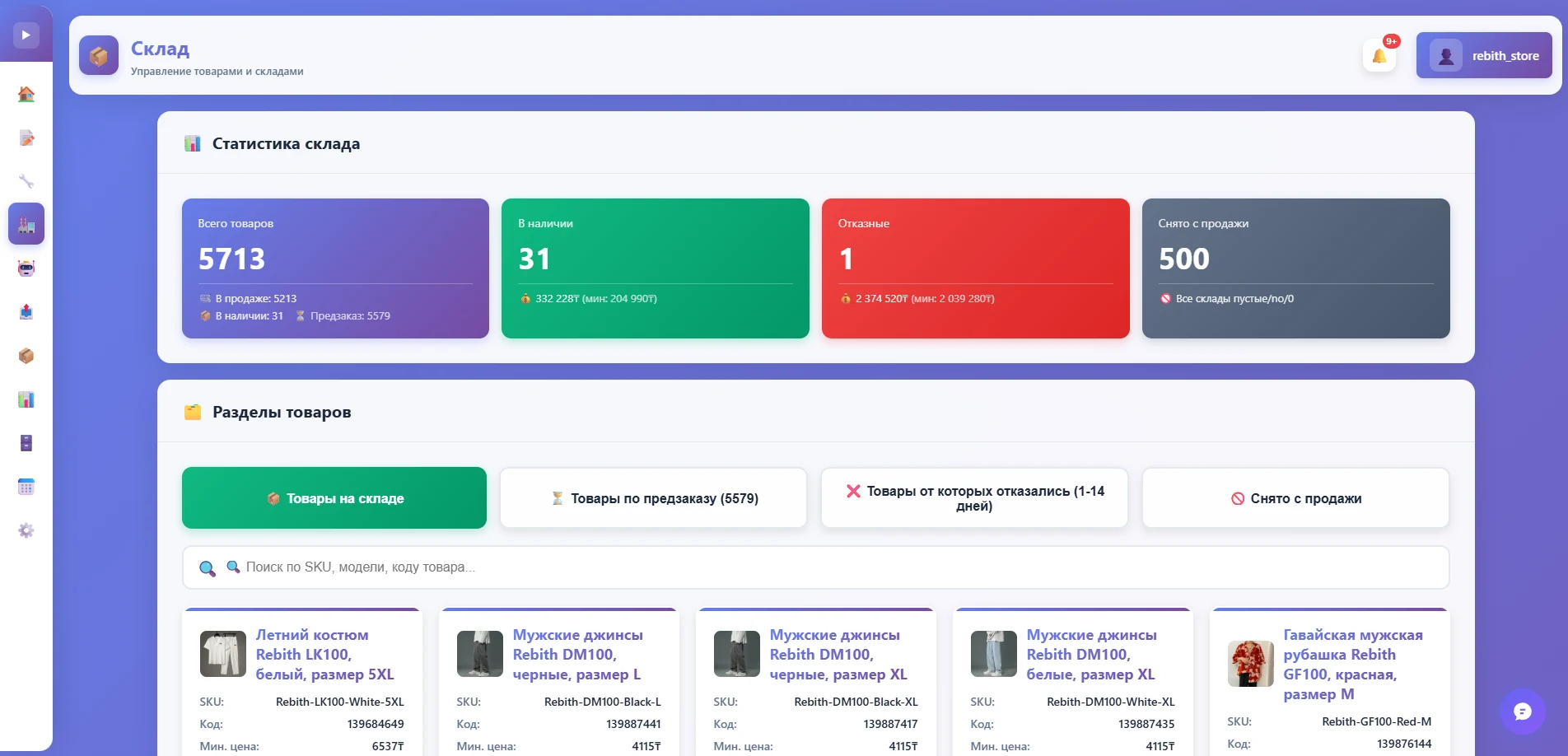
The “Warehouse” section of the RebithReprice panel tracks stock and takes sold-out items off sale. You don’t accept orders for what you don’t have, and the buyer doesn’t get a cancellation.
Why stock tracking matters
If a product runs out but the listing stays on sale, the seller accepts an order they cannot fulfil. A cancellation hurts the store’s rating and the buyer’s trust, and time spent explaining is wasted.
The RebithReprice warehouse solves this automatically: stock is tracked in the panel and sold-out items are taken off sale without your involvement.
What the “Warehouse” section can do
Stock tracking
Product stock is gathered in one panel section — no need to hunt for it in spreadsheets and the cabinet.
Delisting
When a product runs out, it is delisted automatically so you don’t get orders you can’t fulfil.
Several warehouses
If you have several warehouses, orders show where to pick from.
Link with orders
The warehouse works alongside the orders list and Telegram notifications — data stays consistent.
How to use the warehouse in your work
- Keep stock up to date. The more accurate the stock in the panel, the more reliable the automatic delisting.
- Cross-check with orders. The orders list and warehouse in one panel show at once whether you have enough for new sales.
- Use pre-order deliberately. Made-to-order items have a separate pre-order auto-update section that does not mix with regular stock.
- Plan purchasing. You see which items run out most often — restock those first.
Who benefits most from the warehouse
Sellers with a large range and frequent sales where stock changes daily, and stores with several warehouses. For a small store it is protection from the most unpleasant mistake — selling what is already gone.
Common situations the warehouse covers
- A demand spike. A promotion or a season sells out stock quickly — the warehouse stops you from selling beyond what you have.
- A delayed delivery. If goods haven’t arrived on time, they don’t sit on sale “just in case”.
- Several sales channels. When the same product leaves through different routes, one record helps you keep count.
Warehouse together with broadcast and orders
The warehouse is part of one panel: orders arrive in Telegram, repricing holds prices, and buyer communication can run through the “Broadcast” section. More on the page auto-broadcast to Kaspi chat.
| Without stock tracking | With RebithReprice | |
|---|---|---|
| Sold-out product | Stays on sale | Is taken off sale |
| Order cancellations | Possible | Less frequent |
| Stock tracking | Manual spreadsheets | In the panel |
| Several warehouses | Confusion | Visible in orders |
How to connect
Sign up and connect your Kaspi.kz store in the panel with your seller ID and API token. The feature set depends on the plan: what yours includes is shown in your cabinet and on the page pricingpage. If you need help connecting — message us, the WhatsApp link is on the contacts page.
Frequently asked questions
What does the “Warehouse” section do?
It keeps track of product stock and takes items that ran out off sale — so you don’t accept an order for something you don’t have.
Do I need to change stock on Kaspi manually?
No, that is the section’s job: it tracks stock in the panel and takes sold-out items off sale, so manual edits in the cabinet are needed less often.
Does it work with several warehouses?
Yes, orders and notifications show which warehouse to pick from if you have several.
Is the warehouse in every plan?
The feature set depends on the plan. What yours includes is shown in your cabinet and on the pricing page; if in doubt, write to us on WhatsApp.
Can I try it for free?
Yes, there's a free trial period: pay only after you're sure the bot works on your products.
Try it for free
Registration takes a minute. Pay only after you're sure the bot works on your products.
Sign up →