
Friendly stores on Kaspi
Set a separate strategy for your own and partner stores to avoid undercutting one another. The bot handles other competitors using the usual rules.
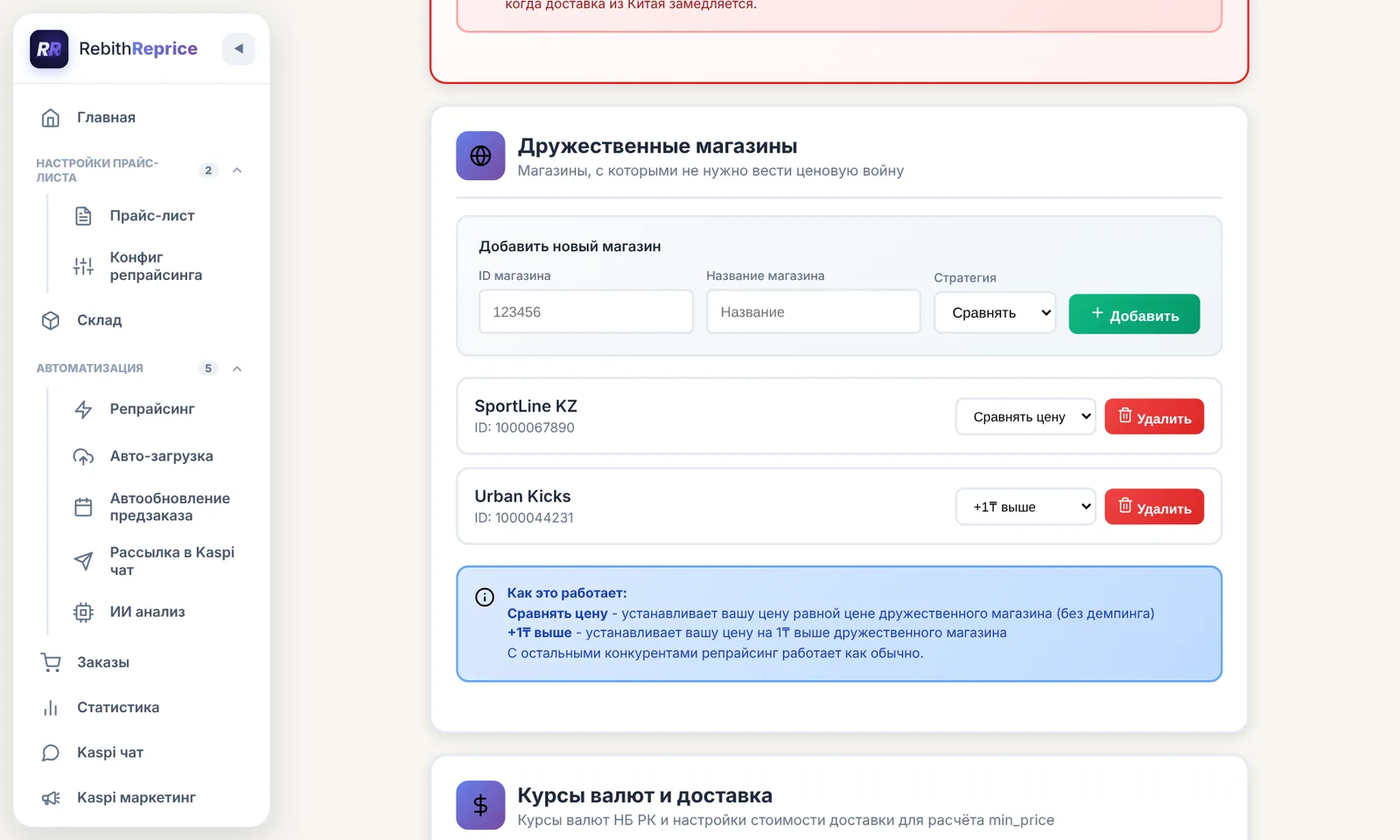
Two strategies for friendly stores
Match
The bot matches the friendly store’s price while respecting the product’s minimum price.
1 ₸ higher
The bot uses the friendly store’s price and sets yours 1 ₸ higher, subject to the product’s price limits.
How to add a store
- Open “Settings” in the bot panel and find “Friendly stores”.
- Enter the store ID and name, then choose “Match” or “+1 ₸”.
- Add the store to the list. You can remove it in settings when needed.
Price limits and other competitors
The product’s minimum price still applies: the bot will not go below it. The maximum price and price-decrease settings also constrain the result.
For sellers outside the friendly list, repricing follows the product’s usual settings. Set up a list for each store where you want to use this strategy.
Frequently asked questions
Which strategies are available for a friendly store?
You can match the store’s price or set yours 1 ₸ higher.
Will the bot sell below the minimum price?
No. The product’s minimum price also applies to the friendly-store strategy.
What happens with other competitors?
For other sellers, repricing follows the product’s usual settings.
How do I remove a store from the list?
Open the friendly-store settings and click “Delete” next to the relevant entry.
Try it for free
Registration takes a minute. Pay only after you're sure the bot works on your products.
Sign up →